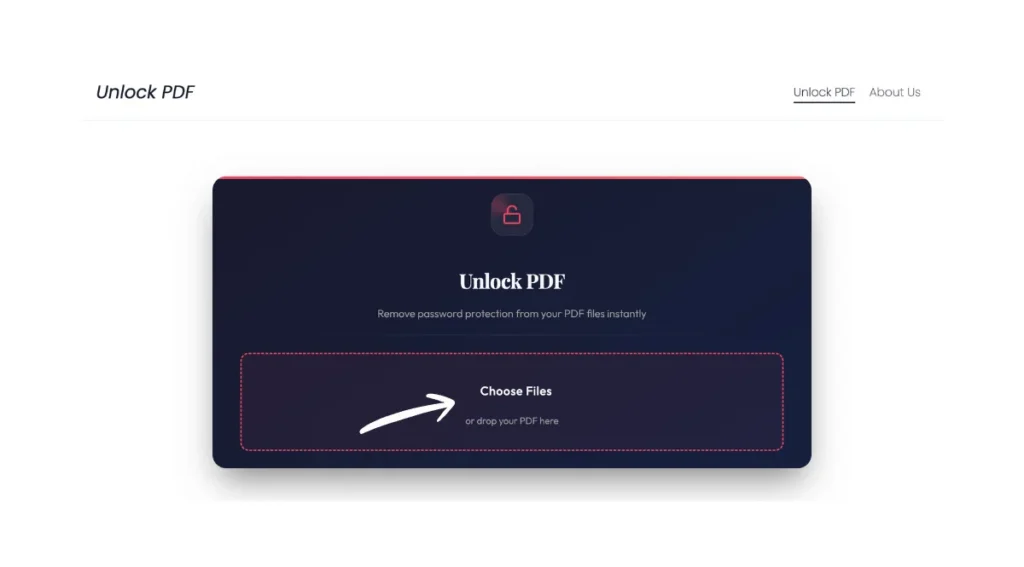
Unlock PDF
Remove password protection from your PDF files instantly
or drop your PDF here
Processing...
This may take a few moments
Unlock PDF | Remove Password & Restrictions Online
If you need instant access to a locked PDF, then our online tool removes open passwords and editing restrictions in seconds. You can view, edit, merge, and share your documents without any trouble. No download is required, and you can just upload a locked PDF file online to unlock it and get back to work right in your browser. So Unlock your Locked pdf with unlockpdf.org.
What Is a Locked PDF?
PDF files can be secured in two different ways. One is an open password, also called a user password, that prevents anyone from viewing the document without entering the correct information. The file remains encrypted, and you will see a password prompt every time you try to open it. The second one is the permissions password or owner password, which is different. It allows the document to be opened freely but restricts specific actions like printing, copying text, or editing content. These restrictions are designed to control how the document is used after it has been shared.
In everyday scenarios, you might encounter locked PDFs everywhere, like old invoices from vendors that can not be printed, signed contracts where you can not extract specific pages, scanned reports that resist copying important data, and archived forms that block any attempt to merge them with other files. These security measures can protect sensitive information, but they often become roadblocks when you are the legitimate owner trying to use your own documents efficiently.
Why Unlock a PDF?
Unlocking a PDF transforms a restricted file into a flexible document you can actually work with. You gain the freedom to edit text and images, add data, merge pages with other documents, digitally sign forms, compress files for easier sharing, and convert content to Word and Excel formats. These capabilities are not just easy, but they are very crucial for modern workflows.
Urgent needs make unlocking PDFs particularly valuable. Imagine needing to update a client contract with new terms before a deadline, extracting specific pages from a lengthy report to share with your team, copying financial data from a locked invoice into your accounting software, or merging multiple restricted documents into a single presentation. Without the ability to unlock these files, each task becomes frustrating and time-consuming or even impossible, forcing you to recreate content from scratch or leave these legitimate business needs unmet.
How to Unlock a PDF Online Through “Unlock PDF”?
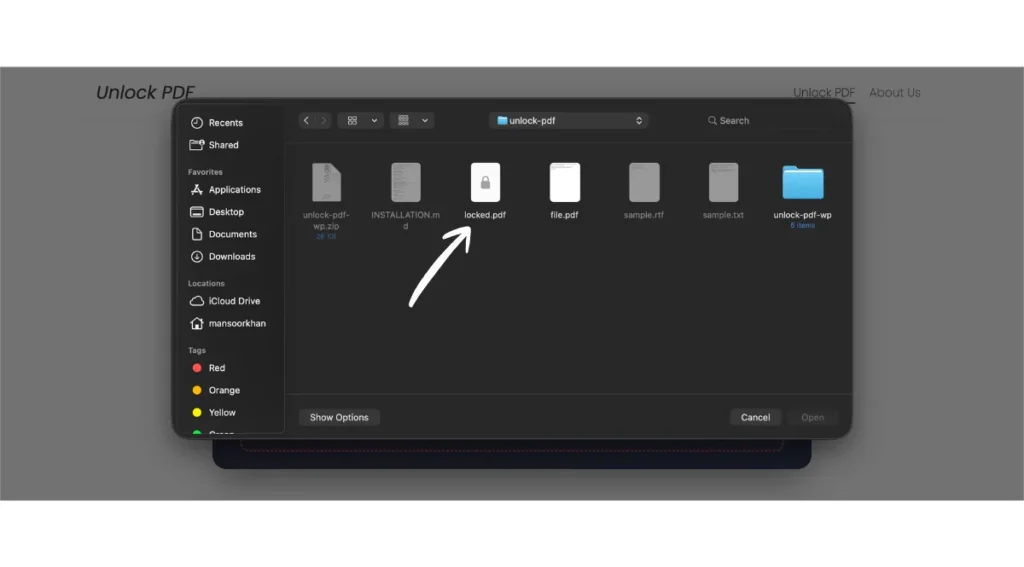
Upload Your Locked PDF
Start by selecting your file using our simple interface. Drag and drop your PDF file directly onto the upload zone, click the file picker to browse your device, or import documents from cloud storage services, including Google Drive, Dropbox, and OneDrive. The tool accepts files of various sizes and works seamlessly across desktop computers, tablets, and mobile devices, so you can unlock PDFs wherever you happen to be working.
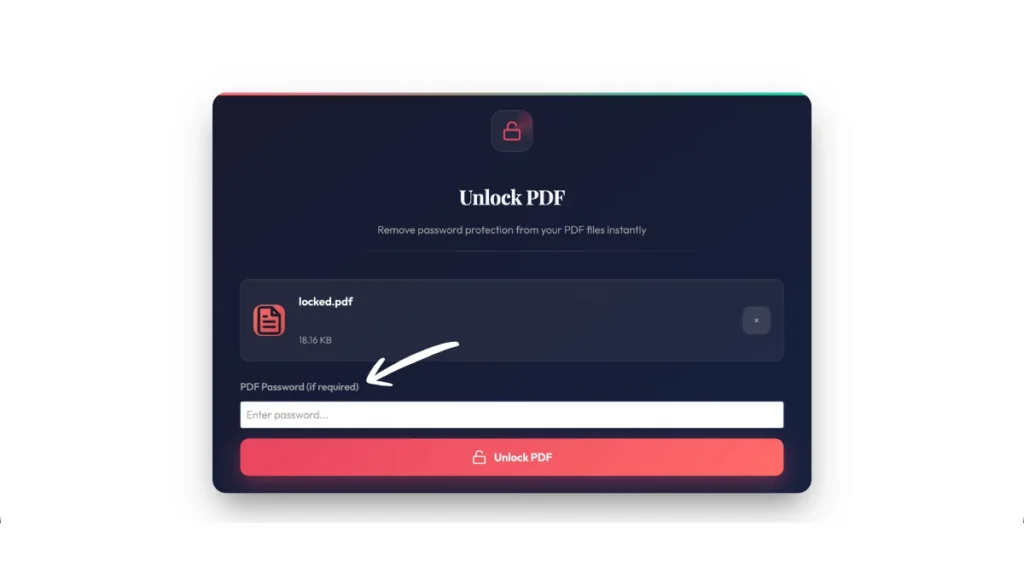
Confirm Permission & Enter Password (If Required)
Before processing begins, you will see a checkbox confirming you have the legal right to unlock the document. This step ensures ethical use of the tool. If your PDF is encrypted with an open password, a secure field will appear where you can enter the information. The password is transmitted using encrypted connections and never stored on our servers. For files protected only by permission restrictions where no password is needed to open them, this step is automatically skipped.
Click Unlock PDF
Once you have uploaded your file and provided any necessary passwords, simply click the Unlock PDF button to begin processing. The tool works in the cloud, analyzing your document’s security settings and removing restrictions within seconds. You will see a progress indicator showing the status, and the entire process preserves your original document quality with no compression, no watermarks, and no changes to fonts, images, or design. Processing time typically ranges from just a few seconds for standard documents to under a minute for larger files with complex security.
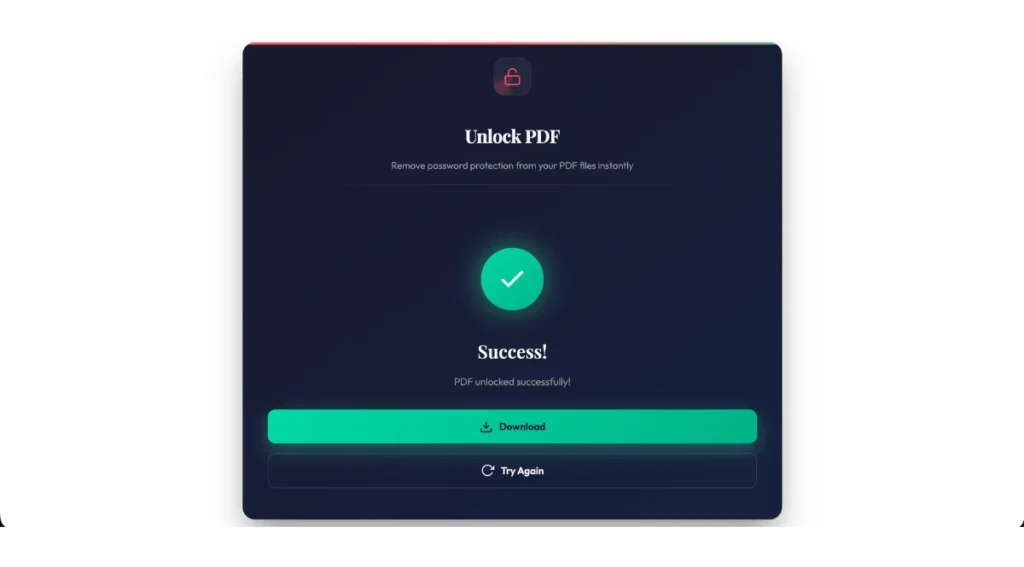
Download or Share the Unlocked File
After processing completes, your unlocked PDF is ready for immediate use. Download the file directly to your device, copy a shareable link to send via messaging apps, email the document to colleagues right from the interface, or save it back to your Google Drive, Dropbox, or OneDrive account for seamless integration with your existing workflows. The unlocked version retains all original content while removing the restrictions that prevented you from working efficiently.
Key Features of Our Unlock PDF Tool
No Software Installation Required
Our platform offers professional level unlocking capabilities that work entirely in your web browser. There is no need to download, install, or update any software on your device. The tool functions very well in Chrome, Firefox, Safari, Edge, and other modern browsers across all operating systems, including Windows, Mac, Linux, and even mobile platforms like Android and iOS.
Removes All Common PDF Restrictions
The unlocking engine targets and removes the most frustrating PDF limitations that block productive work. This includes printing restrictions that stop you from creating physical copies, copying restrictions that block text selection and extraction, editing restrictions that prevent modifications to content, commenting restrictions that disable markup tools, and form-filling restrictions on interactive PDFs. The tool handles both user passwords and owner passwords, giving you complete access to work with your documents however you need.
Preserves Original Document Quality and Formatting
Quality loss is not an issue with our unlocking process. Every element of your PDF remains pixel-perfect after processing, and fonts retain their exact typeface and rendering, images maintain their original resolution without compression artifacts, colors stay true to their original values, page layouts preserve all spacing and alignment, and everything remain fully functional. The unlocked file is functionally identical to the original, just without the security restrictions that were blocking your workflow.
Multiple File Upload Sources for Seamless Integration
Access your locked PDFs from wherever they are stored without the need of multiple downloads. Upload files directly from your local device using drag-and-drop or the file picker, import documents straight from your Google Drive, Dropbox, or OneDrive. This cloud integration eliminates unnecessary extra steps to let you unlock files and save them back to the cloud in a smooth workflow that respects how you actually work with documents.
Fast Processing with Real-Time Progress
Speed matters when you are working against deadlines, and our cloud-based processing delivers results in seconds rather than minutes. Most standard PDFs unlock in under 10 seconds, while even heavily secured documents rarely take more than 30 to 45 seconds to process. A real-time progress indicator shows you exactly where you are in the unlocking process, so you are never left wondering if the tool is working.
Batch Unlock Multiple PDFs Simultaneously
Professional users dealing with high document volumes can benefit enormously from the batch processing capabilities available in Pro plans. Upload 10, 20, or even 50 PDFs at once and process them all simultaneously rather than one at a time. The system maintains individual progress tracking for each file, automatically organizes output files with clear naming, and allows you to download all unlocked documents as a ZIP file. This feature transforms what could be hours of repetitive work into a single streamlined operation.
Integrated PDF Toolkit for Complete Document Management
Unlocking is just the beginning of what you can accomplish without leaving our platform. Once your PDF is accessible, immediately edit text and images using our built-in editor, merge the unlocked file with other documents to create comprehensive reports, split pages to extract only the sections you need, compress large files for easier email sharing and faster uploads, convert PDFs to Word, Excel, PowerPoint, or image formats, add digital signatures for legally binding agreements, or apply new password protection with custom permission settings.
Watermark-Free Downloads with Full Commercial Use Rights
Every file you unlock downloads as a clean and professional document without any watermarks, branding, or advertisements that would mark it as processed through a third-party service. The unlocked PDFs are yours to use however you need like in client presentations, official submissions, commercial projects, or any other professional context, without attribution requirements or usage restrictions. What you download looks exactly like the original file, minus the security restrictions.
Top-Level Security with Automatic File Deletion
Your document privacy receives the same protection as top institutions. We never store your files long-term, never access your document content for any purpose beyond the requested unlocking service, and never use your PDFs for advertising, analytics, or AI training. Your documents remain completely private throughout the brief time they exist on our infrastructure.
Free Tier with Generous Limits Plus Flexible Pro Options
Get started immediately without providing payment information or even creating an account. The free tier offers several unlocks per day with file size limits suitable for most individual documents that is typically up to 15-20 MB. It offers you to evaluate the service and handle occasional unlocking needs at no cost. When your requirements grow, Pro subscriptions remove all limitations with unlimited daily unlocks, and it support files up to 100+ MB in size, batch processing for multiple simultaneous uploads, priority processing for faster results during peak times, extended file retention if you need to re-download processed documents, and want to dedicated customer support. The pro version offers more access and more features for those who want to use it on a daily basis.
Security, Privacy & Legal Use
How do We Protect Your Files?
Your document security matters to us. All file transfers use HTTPS and TLS encryption, protecting your data from interception during upload and download. Our secure cloud servers process your PDFs in isolated environments, and we implement automatic deletion protocols that permanently remove your files within one hour of processing. We never share your documents with third parties, use them for marketing purposes, or include them in AI training datasets. Your files remain completely private throughout the unlocking process and are purged from our systems as soon as you have downloaded them.
Legal & Ethical Use Notice
This tool is designed exclusively for legitimate use cases. You should only unlock PDFs that you created, own, or have the authority to modify. Our unlocking technology cannot and will not crack strong encryption on files where you do not know the password like if a document requires an open password you do not possess and the tool will not bypass that protection. Always respect intellectual property rights and use this service responsibly for your own documents or those you are authorized to handle.
Unlock PDF With and Without a Password
When You Know the Password
If you have the password for a locked PDF, the unlocking process is straightforward. Enter the information once during upload, and the tool will decrypt the file and save a completely unrestricted copy. This approach is ideal when you are tired of entering the same password repeatedly for documents you access frequently and when you need to share files with colleagues who should not require a password, or when preparing documents for workflows that do not support password-protected inputs.
When You Forgot the Password
For permission-restricted PDFs where you can open the file but cannot print or edit, no password is required, and our tool removes those restrictions directly. However, if a document is encrypted with an open password you have forgotten, the situation becomes more complex. Modern PDFs use top-grade 256-bit AES encryption, which cannot be broken through guessing or brute force within any reasonable timeframe. If you are the legitimate owner who has lost access, try checking your password manager for stored credentials, searching email archives for messages from the person who sent you the file, or contacting the document’s creator to request the password or an unlocked version. Our tool cannot bypass strong encryption without the correct password, and any service claiming otherwise for heavily secured files should be approached with skepticism.
After Unlocking: What You Can Do Next
Once your PDF is unlocked, a world of possibilities opens up. Use our PDF editor to modify text, adjust images, add annotations, and correct typos directly in the document. The merge tool lets you combine your unlocked PDF with other files, creating reports or presentations. If you only need specific sections, the split feature extracts pages to create focused documents without unnecessary content.
The platform also allows you to convert your unlocked PDF to Microsoft Word for text editing, export to Excel for data analysis, transform it to PowerPoint for presentations, or save as JPEG or PNG images for sharing visuals. After making changes then use our e-signature tool to add legally binding signatures and then send documents securely through encrypted channels.
Troubleshooting Common Unlock PDF Issues
File Upload Failures
- Check that your file doesn’t exceed the size limit shown on the upload page.
- Verify the file is actually a PDF and not another format like Word and an image with a renamed .pdf extension
- Confirm the file is not corrupted by opening it in Adobe Reader or another PDF viewer first
- Try a different browser if uploads consistently fail in your current one
- Ensure you have a stable internet connection.
- For corrupted documents, you can use Adobe Acrobat’s repair function or a specialized PDF recovery tool before attempting to unlock
Password Errors and Authentication Issues
- Double-check your password for typos, paying close attention to capitalization.
- Copy and paste the password from your password manager instead of typing it manually to avoid entry errors
- Try removing any extra spaces before or after the password if you copied it from an email or document
- Verify you are using the correct password type, like some PDFs have separate user and owner passwords
- If the password is definitely correct but still fails, the file may use a security standard that requires desktop software like Adobe Acrobat Pro
FAQs About Unlocking PDFs
Unlock PDF API and Advanced Options
Developers integrating PDF unlocking into their own applications can leverage our robust API. The system accepts standard REST requests where you upload a password-protected PDF, provide authentication credentials, and receive a notification when processing completes. This enables seamless automation for high-volume document workflows. Our API documentation provides detailed integration guides, code examples in multiple languages, and dedicated technical support to ensure smooth implementation.
Best Practices for Managing Protected PDFs on the “Unlock PDF” Platform
- Deciding when to secure versus unlock PDFs requires thoughtful consideration of your document’s lifecycle.
- Lock files when they contain sensitive information like financial records or personal data, or when copyright protection is essential.
- Unlock files when you need internal editing flexibility, when collaborating with trusted team members who require modification rights, or when preparing documents for workflows that can not handle password protection.
- Maintain security hygiene by keeping an original locked copy in secure storage before distributing unlocked versions.
- Use strong passwords combining uppercase and lowercase letters, numbers, and special characters.
- Limit sharing of unlocked files to trusted recipients only, and consider re-locking documents with fresh passwords before sending them to external parties.
- For collaborative projects, define clear access levels where sensitive sections remain protected while working areas stay unlocked for editing.
Start Unlocking Your PDFs Now with “Unlock PDF”
Stop wrestling with locked documents that slow down your productivity. Our online unlock tool delivers fast, secure, and reliable access to your PDFs without complicated software or technical expertise. You can use it while processing a single invoice or handling dozens of contracts, as this service adapts to your needs. That is free for occasional use, whereas Pro options are available for power users.
Get started in seconds with “Unlock PDF.”
Upload your locked PDF, enter any required password, and download your fully accessible file. No registration required for your first unlock. Experience the freedom of working with your documents your way, with complete control over editing, sharing, and reusing content. Transform restricted PDFs into flexible and workable files today, where your productivity will thank you.
Conclusion
Unlocking PDFs should not be complicated or risky. Our browser-based tool (unlock PDF) offers top-grade security with consumer-friendly simplicity, removing passwords and restrictions in seconds while protecting your privacy. The platform eliminates frustrating restrictions and grants instant PDF access to all locks. The platform’s zero-installation design works anywhere on desktop, tablet, or smartphone, and it is meant to adapt to your work style rather than forcing you to adapt to software limitations. You get professional results without compromising document security with automatic file deletion, encrypted transfers, and watermark-free outputs. Start unlocking today and reclaim control over your PDFs with a tool built for real-world needs.